How to Download Form 106 from the Israel Tax Authority: Step-by-Step Guide with Screenshots

Form 106 is the first document requested whenever you review an employee tax refund or submit an annual tax return to the Israel Tax Authority—and rightly so: it consolidates all your annual payroll data, employer by employer. The good news is that you no longer need to chase down former employers to obtain it. The Israel Tax Authority displays Form 106 directly in its online personal area, and you can download all your forms independently within minutes. In this guide, we walk through each step, accompanied by screenshots, from logging into the personal area to saving the forms onto your computer.
This guide is suitable for anyone needing Form 106: employees checking their tax refund eligibility, individuals filing an annual tax return, and married couples—each of whom downloads their respective forms separately, as detailed below.
What is Form 106 and Why Do You Need It?
Form 106 is an annual certificate issued by employers to employees summarizing the entire tax year: gross taxable salary and payments, withheld income tax, pension and study fund contributions, utilized tax credit points, and statutory deductions. Every employer issues a distinct form. Consequently, if you worked for two employers during the same calendar year—whether concurrently or consecutively—you will require two Form 106 documents for that year (see also our detailed guide on Tax Coordination for Multiple Jobs).
Without Form 106, conducting an accurate tax refund assessment is impossible: the audit compares the income tax withheld at source with the actual annual tax liability based on total annual income, entitled tax credit points, and deductible contributions. A single missing form from an employer can conceal a refund of thousands of Shekels—or inversely, yield an inaccurate calculation. Therefore, it is essential to download all forms from all employers across every assessed tax year.
Before You Begin: What You Need
Only three items are required:
- Your Israeli ID number (Teudat Zehut).
- Your permanent user code for the Israel Tax Authority portal. If you are logging in for the first time or forgot your code, you can register or generate a new code directly on the login screen—explained in Step 1 (see also our Tax Authority Registration Guide).
- Access to your email inbox: After submitting your credentials, a one-time verification code (OTP) will be dispatched to your email, valid for only 4 minutes.
Step 1: Logging in to the Israel Tax Authority Personal Area
Access the personal area via Israel Tax Authority Digital Services Identification Portal. On the login screen, enter your ID number and permanent user code, then click "Continue".
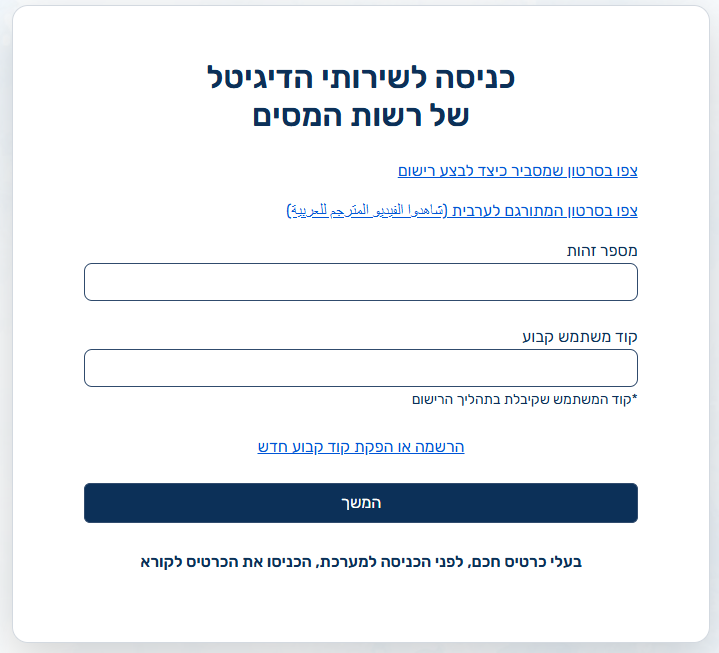
If this is your first login, or if you forgot your permanent code, click the link "Register or generate a new permanent code" beneath the input fields, and follow the on-screen prompts.
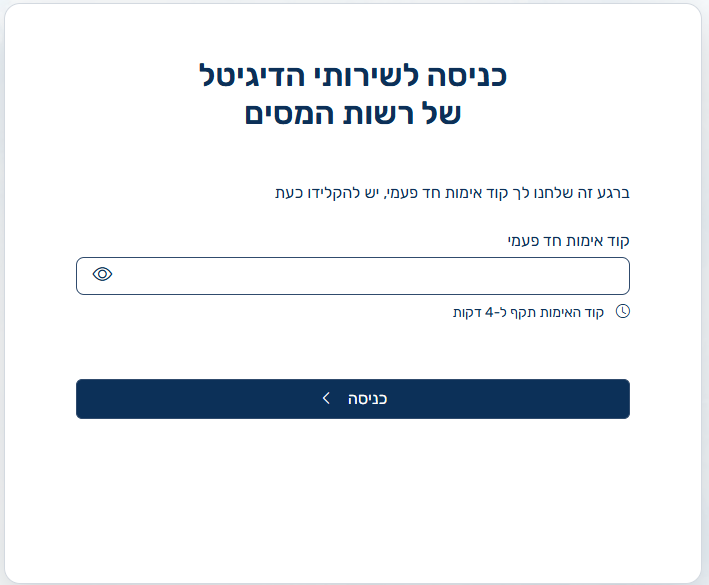
After entering your credentials, a one-time verification code is sent to your email. Enter it into the "One-Time Verification Code" field and click "Login". Note: The code is valid for 4 minutes only, so keep your email open in advance and enter the code promptly upon receipt.
Step 2: Clicking on 'Form 106' on the Main Dashboard
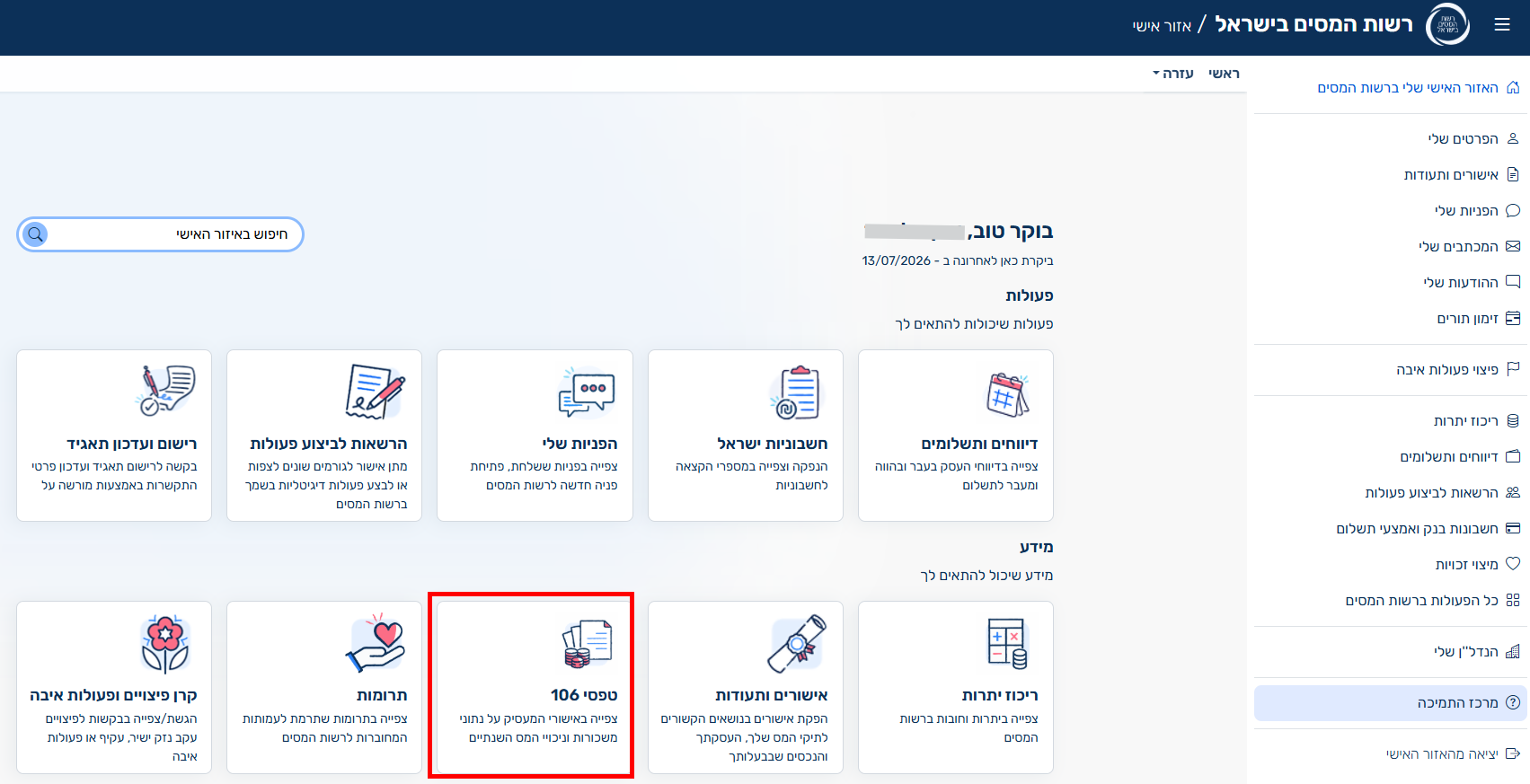
Upon successfully logging in, you arrive at the main dashboard. In the "Information" section, click on the "Form 106" tab—view employer salary reports and annual tax deduction certificates.
Step 3: Selecting the Relevant Tax Year
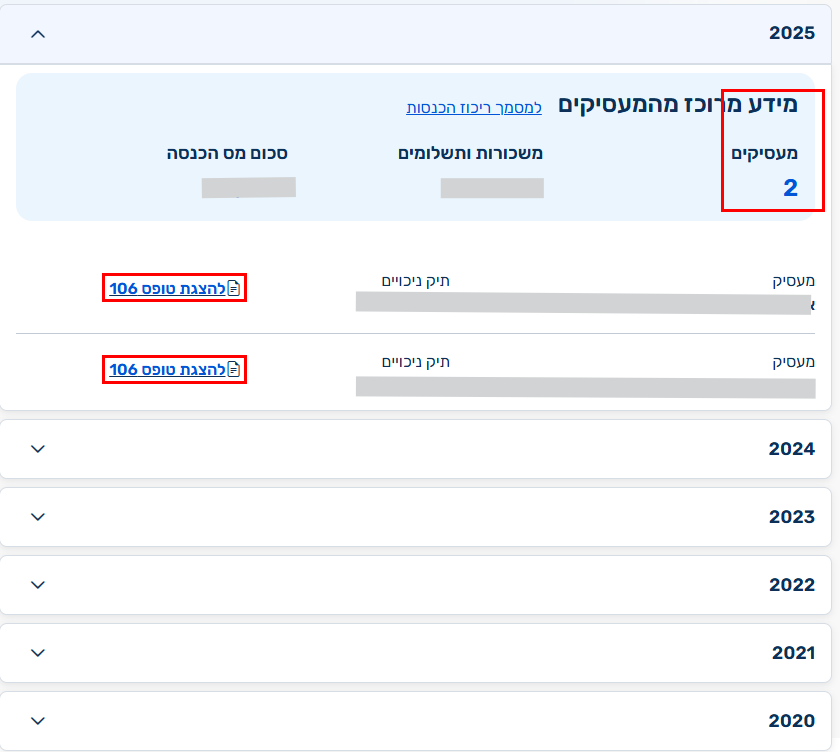
The Form 106 screen presents consolidated employer data for the last 6 tax years, arranged as an expandable list. Click on the arrow next to the relevant year to expand it. Repeat this process for every year under review—standard employee tax refund assessments typically examine all 6 past tax years.
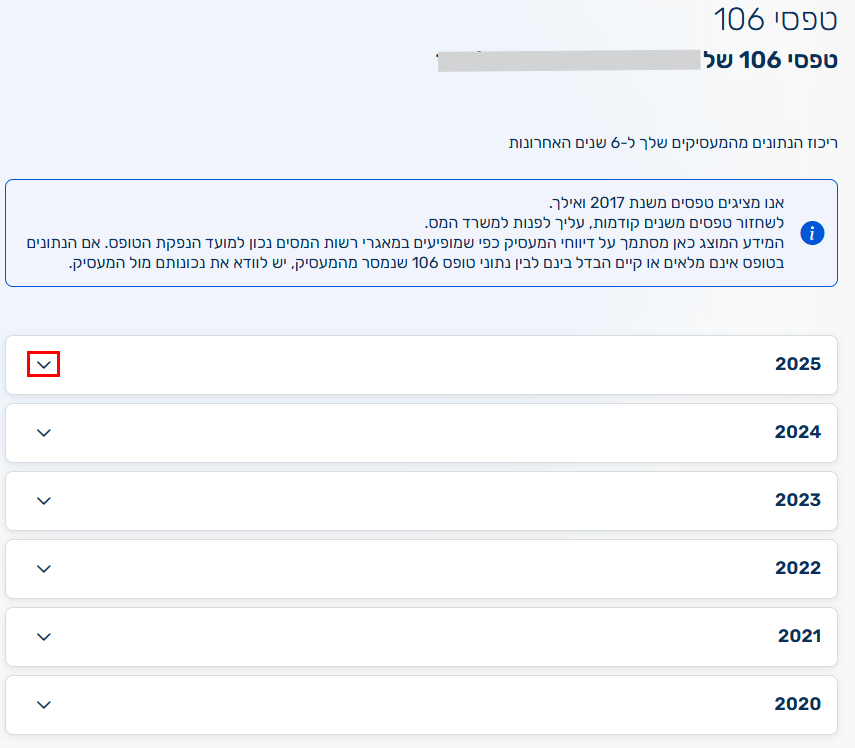
Please Note: The portal displays forms from tax year 2017 onwards. To retrieve records for earlier tax years, you must contact the local Tax Assessment Office (Pakid Shuma). Furthermore, portal records rely on employer submissions as registered in the Tax Authority databases at the time of generation—if data appears incomplete, or if discrepancies exist between the online document and the physical Form 106 received directly from your employer, you must verify accuracy directly with that employer.
Step 4: Opening Each Employer's Form
Once a specific tax year is expanded, consolidated employer data for that year is displayed: number of registered employers, total gross wages and allowances, and total withheld income tax. Below the summary, a distinct row appears for each employer, featuring a link titled "View Form 106". Click the link for each employer individually—each form opens in a separate viewer document.
Step 5: Downloading and Saving the Form to Your Computer
After the form opens, save it by clicking the download icon located on the document viewer toolbar—represented by a downward arrow icon.

Repeat steps 4 and 5 for every employer across each tax year, until all forms are securely stored on your computer. It is strongly recommended to save the files in a single organized folder named "Form 106 Documents", adopting a clear file naming convention that incorporates the tax year and employer name—this eliminates confusion later on.
Important Notes
Employer Not Listed in the Portal
If you worked for an employer during a given tax year and their Form 106 does not appear on the website, contact the employer directly to request the document. Employers are statutorily required under Israeli law to furnish Form 106 to their workers.
Spouses and Married Couples
When assessing tax refund eligibility for married couples or common-law partners, each spouse must log into their individual personal portal account separately and execute all steps in this guide independently. You cannot retrieve a spouse's forms from your personal account.
Verify That All Years and Employers Are Covered
Before submitting your documentation, review each calendar year carefully to ensure no employer has been omitted—particularly short-term positions, temporary contracts, or concurrent employment (read more in our guide: Changing Jobs and Tax Refunds).
What to Do with the Forms After Downloading?
Once you have downloaded all the forms, submit them to our firm—we perform an exhaustive tax refund assessment for every year, employer by employer. The audit includes cross-matching withheld tax against statutory liability, identifying unused credit points, unclaimed personal and pension deductions, and cross-referencing multi-employer withholdings.
You can directly complete our Online Employee Tax Refund Questionnaire or contact us via our Employee Tax Services Page and Tax Consulting Page.
Our assessment is free of charge with zero obligation—No Refund, No Fee. Professional fees apply solely if an actual monetary tax refund is credited to your bank account. Send us your forms and we will promptly report the findings.
Frequently Asked Questions About Form 106
What is Form 106?
Form 106 is an annual certification issued by Israeli employers summarizing an employee's annual payroll: gross salary, tax withheld at source, pension and study fund allocations, and credit points. A separate form is issued by each employer for each tax year.
How many years back can Form 106 be generated from the website?
The online portal retains records from tax year 2017 onwards. However, retroactive tax refund claims are limited to 6 years back—meaning that in 2026, claims can cover tax years 2020 and onward. Forms for years preceding 2017 may be requested directly from the tax office.
What should I do if an employer is not listed on the website?
Contact the employer directly and request Form 106 for that specific tax year. Under Israeli labor and tax legislation, employers are legally obligated to issue the document.
I forgot my permanent user code. What should I do?
On the portal login screen, click "Register or generate a new permanent code" and follow the verification prompts. There is no need to visit the tax office in person.
Do I need a Form 106 from every employer for each year?
Yes. Each employer issues an independent form, and an accurate refund calculation requires complete documentation for all audited years. A missing form can distort calculations and obscure legitimate refunds.
We are a married couple. Can we download both our forms from one account?
No. Each spouse must log in individually using their own ID number and security credentials to download their personal tax forms.
The data on the website form differs from the form given by my employer. Which is correct?
Website data reflects reports transmitted by the employer to Tax Authority databases. If discrepancies exist between the online document and the employer's physical form, clarify the correct figures with the employer prior to filing.
How much does a tax refund review cost?
Our initial assessment is 100% free with no commitment—success-based fee structure: No Refund, No Fee. You only pay a fee if an actual refund is secured.
Summary
Retrieving Form 106 from the Israel Tax Authority is a quick and straightforward task taking only a few minutes: access the personal area, open the 'Form 106' tab, expand each year, and download every employer's certificate. The crucial factor is avoiding omissions—a missing form could obscure money legitimately owed to you. Once your forms are downloaded, send them to our office, and we will evaluate your refund eligibility with no upfront fees or obligations.
Related Services & Guides
📍 Bernstein & Co. Certified Public Accountants – 2 Khuri St, Haifa.
Contact Us